Page: 1
/ 14
Total 52 questions
Proofpoint Certified Threat Protection Analyst PPAN01 Exam Questions
Question 1
Which Proofpoint product quarantines malicious email after delivery?
Answer : D
TRAP (Threat Response Auto-Pull) is the Proofpoint capability designed for post-delivery remediation---it can locate and quarantine/pull messages from user mailboxes after they have already been delivered. This is critical in real-world IR because many threats are discovered after initial delivery (e.g., URL reputation flips, delayed detonation results, user-reported phish via ''Report Suspicious,'' or new campaign intelligence). TAP provides detection, verdicting, and campaign intelligence, but TRAP is the mechanism that operationalizes containment inside mailboxes by removing the message from inboxes and other folders to reduce further exposure. In incident handling, TRAP actions are commonly paired with scoping queries (who received it), retroactive search for similar messages, and compensating controls (URL Defense blocks, domain blocks, authentication enforcement). Using TRAP effectively reduces ''time at risk'' and limits additional clicks or credential submissions after the incident is identified. It also supports auditability by recording which mailboxes were remediated and whether any items were ''unavailable,'' which becomes a follow-up scoping requirement.
Question 2
You would like to view the total number of uncleared threats or false positives that have been interacted with by users over the past 2 weeks. How can this be accomplished on the TAP Dashboard?
Answer : C
''Interacted with by users'' maps to Proofpoint's Impacted concept---users who clicked, engaged, or otherwise interacted with the threat (depending on threat type and telemetry). To view the total count of uncleared threats or false positives with interaction in the last two weeks, you use the Threats page with a Last 14 days time filter and then sort or focus via the Impacted column (C). Intended measures attempted targeting; At Risk reflects delivery/exposure without necessarily any interaction; Highlighted flags special categories (notable techniques, false positive indicators, notable items) but is not the direct measure of user interaction. In Proofpoint-focused IR, ''Impacted last 14 days'' is a core operational view because it narrows work to threats with the highest likelihood of real compromise outcomes (credential submission, malware execution, BEC replies). Analysts then pivot into impacted-user drilldowns to confirm whether the threat is still uncleared, whether post-delivery quarantine has succeeded, and whether user remediation is required. This is also a key SOC metric for prioritization and for demonstrating risk reduction when controls and training reduce impacted counts over time.
Question 3
An analyst wants to use the Threats page in TAP Dashboard to review all messages related to a phishing campaign that contain an attachment. What is the correct method to filter these messages?
Answer : A
The TAP Threats page is designed for investigation by applying structured filters that constrain the dataset by threat category (e.g., phishing), grouping (e.g., campaigns), and threat type (e.g., attachment vs URL). Using the threat filter controls (A) is the most reliable, repeatable method because it leverages the dashboard's native taxonomy and ensures you are viewing only messages that meet both conditions: campaign association and attachment presence. The Impacted tab (B) is user-impact oriented and does not inherently filter to ''phishing campaign + attachment''; it is used after threats are identified to see interactions. The Highlighted tab (D) is focused on notable techniques and analyst-marked items rather than campaign scoping. While the search bar can be useful for pivots, the most ''documented workflow'' approach for consistent IR triage is applying the built-in threat filters, which also supports sharing consistent views across analysts and generating stable results for incident notes and reporting. This is aligned with Proofpoint IR operational practice: filter pivot into details scope recipients take remediation actions.
Question 4
Refer to Exhibit:
X-Proofpoint-Banner-Trigger: inbound
MIM-version: 1.0
Content-Type: multipart/mixed; boundary="boundary-1698346305"
X-CLX-Shades: MLX
X-Proofpoint-Virus-Version: vendor=baseguard
engine=ICAP:2.0.272,Aquarius:18.0.987,Hydra:6.0.619,FMLib:17.11.176.26 definitions=2023-10-26_22,2023-10-26_01,2023-05-22_02
X-Proofpoint-Spam-Details: rule=spam policy=default score=89 bulkscore=0 phishscore=0 mlxlogscore=-91 suspectscore=0 malwarescore=0 adultscore=0 spamscore=89 classifier=spam adjust=0 reason=mlx scancount=l engine=8.12.0-2310240000 definitions=main-2310260209
In the process of reviewing a false positive, you see the following email header. What was the reason the message was quarantined by the Proofpoint Protection Server?
Answer : A
The header contains X-Proofpoint-Spam-Details: rule=spam policy=default ... spamscore=89 ... reason=mlx, which is the Proofpoint spam engine verdict (MLX classifier) and indicates quarantine was driven by the spam policy evaluation, not by anti-virus or a user block list. In Proofpoint PPS/PoD, quarantine decisions frequently include an ''X-Proofpoint-*Details'' header that records the policy, rule family, and scoring components used to reach the final disposition. Here, the high spamscore=89 is decisive, and there is also an MLX log score entry supporting the ML-based spam classification. Antivirus-related quarantines typically show explicit malware/virus condemnation outcomes (e.g., malware score, ''virus'' rule, or attachment verdicts), while personal block list actions would be reflected as user-specific allow/block triggers, not the spam classifier rule. For IR triage, this header is the fastest way to validate why a message was quarantined and whether a false positive should be addressed by tuning spam thresholds, allow lists, or MLX-related settings rather than malware policies.
Question 5
A college student receives the email shown in the exhibit.
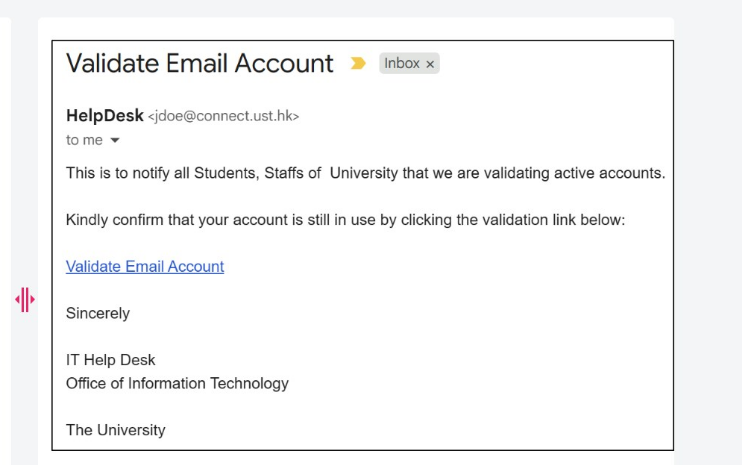
What type of attack is being performed?
Answer : B
This is a classic phishing lure (''Validate Email Account'') where the attacker aims to create trust by presenting a familiar-looking sender identity to the recipient. In many real phishing waves, attackers manipulate what the user visually trusts first: the friendly name (display name) shown by mail clients. ''Display Name Spoofing'' is specifically when the attacker sets the From display name to something authoritative (e.g., ''HelpDesk'', ''IT Support'', ''University Admin'') while the underlying sender address may not be an approved helpdesk identity, or may be a compromised mailbox that is not actually the IT department. Proofpoint IR review commonly verifies this by comparing: (1) the displayed name, (2) the RFC5322.From address, and (3) authentication results (SPF/DKIM/DMARC) plus ''Header From vs Envelope From'' alignment. Lookalike domain focuses on deceptive domains (e.g., great-c0mpany.com) rather than the visible name; Reply-To spoofing requires a mismatched Reply-To field, which is not the primary indicator shown in the exhibit. For response, analysts prioritize user notification, link detonation/URL Defense verdicts, and retroactive search-and-pull (TRAP/CTR) if delivered.
Question 6
Which TAP Reports tab provides a view of the distribution of threats against your organization, including quantity of messages, variation of threat campaigns seen, and the number of individual threats that weren't part of a campaign?
Answer : A
The ''Landscape'' report (A) is designed to summarize the overall threat distribution against the organization---how much malicious mail is being seen, what categories dominate (phish/malware/impostor), how many distinct campaigns are active, and how many threats appear as one-offs (not clustered into campaigns). In Proofpoint-driven detection and analysis, this view supports strategic triage and posture assessment: it helps a SOC understand whether they are facing broad commodity spam/phishing, a few concentrated campaigns, or many unique targeted attacks. It also informs resource planning (analyst workload), control tuning (URL/attachment policies), and targeted mitigations (blocklists, stricter policies for high-risk groups). ''Effectiveness'' typically focuses on outcomes (blocked vs delivered, prevented clicks, remediation success), ''Objectives'' aligns to attacker goals (credential theft, malware delivery, BEC), and ''Organization'' is commonly more about organizational breakdowns (departments, user groups, VIPs). For incident response planning, the Landscape tab provides the ''what are we facing overall'' context that helps prioritize prevention initiatives and define detection coverage gaps.
Question 7
Which two factors make Business Email Compromise (BEC) attacks difficult to detect? (Select two.)
Answer : C, D
BEC is difficult to detect primarily because it often lacks ''traditional malware signals'' and instead relies on human deception. Social engineering (C) is core: attackers craft believable narratives (invoice urgency, legal requests, gift card scams, payroll changes) tailored to organizational context. Impersonation (D) is the second pillar: display-name spoofing, lookalike domains, compromised vendor accounts, and executive/finance role impersonation. These tactics can produce messages that are text-only, low-volume, and free of obviously malicious attachments/URLs, making signature-based or URL reputation controls less effective. Proofpoint-specific defenses therefore emphasize identity and relationship signals (impostor detection, supplier risk, unusual sending patterns), authentication (SPF/DKIM/DMARC alignment), and behavioral context (who typically emails whom, anomalies in reply chains, newly observed domains). In IR, analysts triage BEC by validating headers, checking domain age and similarity, confirming invoice/payment workflows out-of-band, and scoping for mailbox compromise (rules/forwarding, suspicious OAuth grants). Because BEC ''looks normal'' at the technical layer, effective detection requires combining Proofpoint telemetry with process controls and fast escalation to business stakeholders.
 All Official Question Types