Page: 1
/ 14
Total 60 questions
Pure Storage FlashArray Architect Associate FAAA_004 Exam Questions
Question 1
What causes a disruption to Pure FlashArray stateless controller operations or performance, if there is a single array?
Answer : B
Among the listed options, physically relocating an array is the action most likely to cause a disruption to Pure FlashArray stateless controller operations or performance.
Why This Matters:
Physical Relocation:
Moving a FlashArray involves powering down the system, disconnecting cables, and transporting the hardware to a new location. This process inherently disrupts operations and performance until the array is reinstalled and brought back online.
Even with proper planning, physical relocation introduces downtime and potential risks (e.g., hardware damage during transport).
Why Not the Other Options?
A . Replacing a controller I/O module:
FlashArray controllers are designed with redundancy and hot-swappable components. Replacing an I/O module typically does not cause significant disruptions, as the other controller continues to handle operations.
C . Moving from a SAS- to NVMe-based shelf:
Transitioning to NVMe-based shelves is a planned upgrade that does not inherently disrupt operations. The array can continue functioning during the transition, though performance may vary temporarily.
D . Upgrade Purity//FA code:
Upgrading Purity//FA (the operating system for FlashArray) is a non-disruptive process. FlashArray supports rolling upgrades, ensuring continuous availability and performance during the update.
Key Points:
Physical Relocation: Causes unavoidable downtime and operational disruption.
Redundancy and Non-Disruptive Operations: FlashArray is designed to minimize disruptions for tasks like module replacement and software upgrades.
Planning Required: Physical relocation requires careful planning to minimize risks and downtime.
Pure Storage FlashArray Documentation: 'Maintenance and Relocation Best Practices'
Pure Storage Whitepaper: 'Non-Disruptive Operations with FlashArray'
Pure Storage Knowledge Base: 'Minimizing Disruptions During Array Maintenance'
Question 2
What is the return window as defined by the Love Your Storage Guarantee?
Answer : B
The return window as defined by the Love Your Storage Guarantee is 30 days .
Why This Matters:
Love Your Storage Guarantee:
This guarantee allows customers to return or exchange hardware components (e.g., controllers) within a specified return window if they do not meet their needs.
The 30-day return window ensures customers have sufficient time to evaluate the hardware and make adjustments as needed.
Why Not the Other Options?
A . 15 days:
A 15-day return window would be too short for most customers to fully evaluate their hardware and make informed decisions.
C . 60 days:
While 60 days is longer, it exceeds the standard return window defined by Pure Storage for the Love Your Storage Guarantee.
D . 90 days:
A 90-day return window is significantly longer than the standard 30-day period and is not aligned with Pure Storage's policies.
Key Points:
30-Day Return Window: Provides customers with ample time to evaluate hardware components.
Customer-Centric Approach: Reflects Pure Storage's commitment to ensuring customer satisfaction.
Policy Compliance: Ensures alignment with Pure Storage's official return policies.
Pure Storage Evergreen//Forever Documentation: 'Love Your Storage Guarantee Terms and Conditions'
Pure Storage Knowledge Base: 'Understanding the Love Your Storage Return Policy'
Question 3
What does Pure Storage's Right-Size Guarantee promise?
Answer : B
Pure Storage's Right-Size Guarantee promises the effective capacity of the FlashArray , ensuring that customers receive the logical capacity they expect based on their workload's data reduction profile.
Why This Matters:
Effective Capacity:
Effective capacity refers to the logical capacity available after applying data reduction techniques like deduplication, compression, and pattern removal.
The Right-Size Guarantee ensures that customers achieve the expected effective capacity for their workloads, aligning with Pure Storage's commitment to delivering predictable and reliable storage solutions.
Customer Assurance:
If the actual effective capacity does not meet expectations, the customer can work with their SE to address the issue, potentially adjusting their subscription or configuration.
Why Not the Other Options?
A . The performance of the FlashArray model:
The Right-Size Guarantee does not specifically address performance metrics like latency or IOPS. It focuses on capacity-related assurances.
C . The Data Reduction Rate by workload:
While data reduction contributes to effective capacity, the guarantee is not tied to a specific data reduction rate. Instead, it ensures the overall effective capacity meets expectations.
D . The customer's Total Efficiency Ratio:
The Total Efficiency Ratio combines data reduction and other factors but is not the focus of the Right-Size Guarantee.
Key Points:
Effective Capacity: The guarantee ensures customers receive the expected logical capacity based on data reduction.
Data Reduction Techniques: Deduplication, compression, and pattern removal contribute to effective capacity.
Customer Support: Customers can collaborate with their SE if the guaranteed capacity is not achieved.
Pure Storage Evergreen//Forever Documentation: 'Understanding the Right-Size Guarantee'
Pure Storage Whitepaper: 'Maximizing Data Reduction with FlashArray'
Pure Storage Knowledge Base: 'Right-Size Guarantee Terms and Conditions'
Question 4
A cost-conscious customer at a small regional hospital is running a PACS image archive on an NL-disk array.
The customer has the following requirements:
* More than 1 PB of storage
* Latency is not a concern
* Customer user shares must be on the same array
Which solution will meet the customer's needs?
Answer : C
The customer at the small regional hospital requires a storage solution for a PACS image archive with the following requirements:
More than 1 PB of storage
Latency is not a concern
Customer user shares must be on the same array
The best solution to meet these needs is FlashArray//C .
Why This Matters:
FlashArray//C:
FlashArray//C is designed for capacity-optimized workloads , making it ideal for use cases like PACS image archives that require large amounts of storage at a lower cost per GB.
It supports QLC flash technology , which provides high density and cost efficiency for less performance-intensive workloads.
With its ability to scale to over 1 PB of storage, FlashArray//C can meet the customer's capacity requirements while supporting both block and file workloads (e.g., user shares) on the same array using FA File Services .
Why Not the Other Options?
A . FlashArray//X:
FlashArray//X is optimized for high-performance workloads, such as databases and mission-critical applications. While it supports large capacities, it is more expensive and not the most cost-effective solution for latency-insensitive workloads like PACS archives.
B . FlashArray//XL:
FlashArray//XL is designed for extreme-scale workloads requiring massive performance and capacity. It is overkill for this use case and would significantly increase costs without providing proportional benefits.
Key Points:
FlashArray//C: Provides high-density storage at a low cost per GB, ideal for large-scale, latency-insensitive workloads.
Unified Storage: Supports both block and file workloads on the same array, meeting the requirement for user shares.
Cost Efficiency: Balances performance and cost, making it suitable for PACS archives and similar use cases.
Pure Storage FlashArray//C Documentation: 'Use Cases for FlashArray//C'
Pure Storage Whitepaper: 'Optimizing Storage Costs with FlashArray//C'
Pure Storage Knowledge Base: 'Choosing the Right FlashArray Model for Your Workload'
Question 5
A customer has deployed an ActiveCluster solution with Uniform Configuration. The customer wants to make sure that all host connections are configured to the array according to best practices.
What Fibre Channel connections should the architect recommend for the customer to use?
Answer : A
For an ActiveCluster solution with Uniform Configuration , the architect should recommend dual connections from each controller through two fabrics to ensure high availability and redundancy in Fibre Channel connectivity.
Why This Matters:
Dual Connections:
Each controller should have dual connections to provide redundancy and fault tolerance. If one connection fails, the other ensures uninterrupted communication between the host and the array.
Two Fabrics:
Using two independent Fibre Channel fabrics (e.g., Fabric A and Fabric B) ensures that there is no single point of failure in the network infrastructure. This aligns with best practices for ActiveCluster deployments.
Why Not the Other Options?
B . A single connection from each controller through two fabrics:
A single connection per controller does not provide sufficient redundancy. If the connection fails, the host may lose access to the array.
C . Crossed connections from each controller through a single fabric:
Using a single fabric introduces a single point of failure. Additionally, 'crossed connections' are not a standard or recommended configuration for ActiveCluster.
D . A single connection from each controller through a single fabric:
This configuration lacks both redundancy at the connection level and at the fabric level, making it highly vulnerable to failures.
Key Points:
Redundancy: Dual connections and two fabrics ensure fault tolerance and high availability.
Best Practices: Aligns with Pure Storage's recommendations for ActiveCluster deployments.
Uniform Configuration: Ensures consistent and reliable connectivity across all hosts in the cluster.
Pure Storage FlashArray Documentation: 'ActiveCluster Best Practices for Fibre Channel Connectivity'
Pure Storage Whitepaper: 'Designing High-Availability Solutions with ActiveCluster'
Pure Storage Knowledge Base: 'Configuring Host Connections for ActiveCluster'
Question 6
A customer has a requirement for 450 TB of block storage to support their tier2 environment where latency is not a concern. The workload is expected to achieve a 4-to-l data reduction.
Which array and capacity configuration is the minimum required to meet their needs?
Answer : A
To meet the customer's requirement for 450 TB of block storage with a 4:1 data reduction ratio, we need to calculate the effective usable capacity required and select the appropriate array configuration.
Step-by-Step Calculation:
Effective Usable Capacity Needed :
The workload requires 450 TB of logical storage.
With a 4:1 data reduction ratio, the physical storage required is:

Array Selection :
The selected array must provide at least 112.5 TB of usable capacity after accounting for overhead and RAID protection.
Let's evaluate the options:
A . FlashArray//C40R3 247 TB :
The FlashArray//C40R3 provides 247 TB of raw capacity. After accounting for overhead (typically ~20%), the usable capacity is approximately:UsableCapacity=247TB0.8=197.6TB.
This exceeds the required 112.5 TB , making it a valid option.
B . FlashArray//C60R3 878 TB :
The FlashArray//C60R3 provides 878 TB of raw capacity, which is significantly larger than needed. While it meets the requirement, it is not the minimum configuration.
C . FlashArray//X70R3 228 TB :
The FlashArray//X70R3 provides 228 TB of raw capacity. After overhead, the usable capacity is approximately:UsableCapacity=228TB0.8=182.4TB.
While this also meets the requirement, it is more expensive than the C40R3.
D . FlashArray//C60R3 366 TB :
The FlashArray//C60R3 with 366 TB of raw capacity is overkill for this requirement and not cost-effective.
Recommendation :
The FlashArray//C40R3 247 TB provides the minimum required usable capacity while meeting the customer's needs.
Final Recommendation:
The correct answer is A. FlashArray//C40R3 247 TB .
FlashArray//C Series Product Overview :
FlashArray//C Series
Details the capacity and use cases for FlashArray//C models.
Capacity Planning Guide :
Pure Storage Capacity Planning
Provides guidance on calculating usable capacity based on data reduction ratios.
Question 7
Refer to the exhibit.
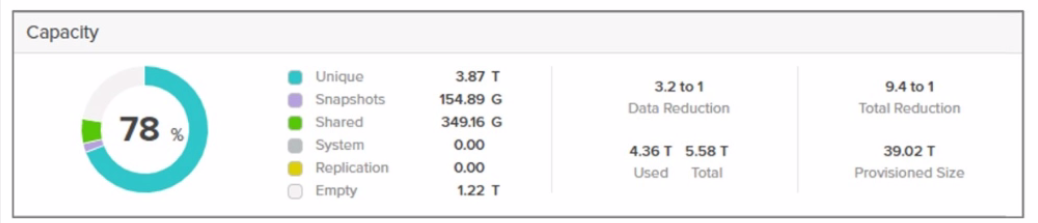
What is the total amount of usable storage space consumed on this FlashArray system?
Answer : A
Why This Matters:
Usable Storage Space Consumed:
The 'usable storage space consumed' refers to the actual physical capacity used on the array after accounting for RAID overhead but before applying data reduction techniques like deduplication and compression.
This value represents the raw space utilized by the data stored on the array, excluding any logical space savings from data reduction.
Why Not the Other Options?
B . 5.58 T:
This value likely represents the logical capacity provisioned or consumed after applying data reduction techniques (e.g., deduplication and compression). However, the question specifically asks for the usable storage space consumed , which excludes logical space savings.
C . 1.22 T:
This value might represent the raw capacity of the drives or some other metric unrelated to the usable storage space consumed. It does not align with the definition of usable storage space.
D . 4.36 T:
This value could represent an intermediate calculation or another metric, but it does not match the usable storage space consumed as shown in the exhibit.
Key Points:
Usable Storage Space Consumed: Represents the physical capacity used on the array after RAID overhead but before data reduction.
Logical vs. Physical Capacity: Logical capacity reflects space savings from deduplication and compression, while usable storage space reflects the actual physical usage.
Exhibit Analysis: Carefully interpret the metrics provided in the exhibit to identify the correct value.
Pure Storage FlashArray Documentation: 'Understanding Array Capacity Metrics'
Pure Storage Whitepaper: 'Capacity Management and Data Reduction'
Pure Storage Knowledge Base: 'What is Usable Space vs. Raw Space?'
 All Official Question Types