Page: 1
/ 14
Total 30 questions
Python Institute PCEP - Certified Entry-Level Python Programmer PCEP-30-02 Exam Questions
Question 1
Assuming that the following assignment has been successfully executed:

Which of the following expressions evaluate to True? (Select two expressions.)
Answer : C, D
The code snippet that you have sent is assigning a list of four values to a variable called ''the_list''. The code is as follows:
the_list = ['1', 1, 1, 1]
The code creates a list object that contains the values '1', 1, 1, and 1, and assigns it to the variable ''the_list''. The list can be accessed by using the variable name or by using the index of the values. The index starts from 0 for the first value and goes up to the length of the list minus one for the last value. The index can also be negative, in which case it counts from the end of the list. For example, the_list[0] returns '1', and the_list[-1] returns 1.
The expressions that you have given are trying to evaluate some conditions on the list and return a boolean value, either True or False. Some of them are valid, and some of them are invalid and will raise an exception. An exception is an error that occurs when the code cannot be executed properly. The expressions are as follows:
A) the_List.index {''1''} in the_list: This expression is trying to check if the index of the value '1' in the list is also a value in the list. However, this expression is invalid, because it uses curly brackets instead of parentheses to call the index method. The index method is used to return the first occurrence of a value in a list. For example, the_list.index('1') returns 0, because '1' is the first value in the list. However, the_list.index {''1''} will raise a SyntaxError exception and output nothing.
B) 1.1 in the_list |1:3 |: This expression is trying to check if the value 1.1 is present in a sublist of the list. However, this expression is invalid, because it uses a vertical bar instead of a colon to specify the start and end index of the sublist. The sublist is obtained by using the slicing operation, which uses square brackets and a colon to get a part of the list. For example, the_list[1:3] returns [1, 1], which is the sublist of the list from the index 1 to the index 3, excluding the end index. However, the_list |1:3 | will raise a SyntaxError exception and output nothing.
C) len (the list [0:2]} <3: This expression is trying to check if the length of a sublist of the list is less than 3. This expression is valid, because it uses the len function and the slicing operation correctly. The len function is used to return the number of values in a list or a sublist. For example, len(the_list) returns 4, because the list has four values. The slicing operation is used to get a part of the list by using square brackets and a colon. For example, the_list[0:2] returns ['1', 1], which is the sublist of the list from the index 0 to the index 2, excluding the end index. The expression len (the list [0:2]} <3 returns True, because the length of the sublist ['1', 1] is 2, which is less than 3.
D) the_list. index {'1'} -- 0: This expression is trying to check if the index of the value '1' in the list is equal to 0. This expression is valid, because it uses the index method and the equality operator correctly. The index method is used to return the first occurrence of a value in a list. For example, the_list.index('1') returns 0, because '1' is the first value in the list. The equality operator is used to compare two values and return True if they are equal, or False if they are not. For example, 0 == 0 returns True, and 0 == 1 returns False. The expression the_list. index {'1'} -- 0 returns True, because the index of '1' in the list is 0, and 0 is equal to 0.
Therefore, the correct answers are C. len (the list [0:2]} <3 and D. the_list. index {'1'} -- 0.
Question 2
What is the expected output of the following code?
Answer : D
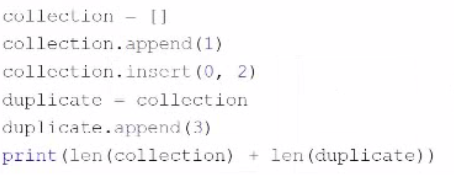
The code snippet that you have sent is trying to print the combined length of two lists, ''collection'' and ''duplicate''. The code is as follows:
collection = [] collection.append(1) collection.insert(0, 2) duplicate = collection duplicate.append(3) print(len(collection) + len(duplicate))
The code starts with creating an empty list called ''collection'' and appending the number 1 to it. The list now contains [1]. Then, the code inserts the number 2 at the beginning of the list. The list now contains [2, 1]. Then, the code creates a new list called ''duplicate'' and assigns it the value of ''collection''. However, this does not create a copy of the list, but rather a reference to the same list object. Therefore, any changes made to ''duplicate'' will also affect ''collection'', and vice versa. Then, the code appends the number 3 to ''duplicate''. The list now contains [2, 1, 3], and so does ''collection''. Finally, the code tries to print the sum of the lengths of ''collection'' and ''duplicate''. However, this causes an exception, because the len function expects a single argument, not two. The code does not handle the exception, and therefore outputs nothing.
The expected output of the code is nothing, because the code raises an exception and terminates. Therefore, the correct answer is D. The code raises an exception and outputs nothing.
Question 3
Which of the following are the names of Python passing argument styles?
(Select two answers.)
Answer : A, D
Keyword arguments are arguments that are specified by using the name of the parameter, followed by an equal sign and the value of the argument. For example,print (sep='-', end='!')is a function call with keyword arguments.Keyword arguments can be used to pass arguments in any order, and to provide default values for some arguments1.
Positional arguments are arguments that are passed in the same order as the parameters of the function definition. For example,print ('Hello', 'World')is a function call with positional arguments.Positional arguments must be passed before any keyword arguments, and they must match the number and type of the parameters of the function2.
Question 4
What is the expected output of the following code?
Answer : D
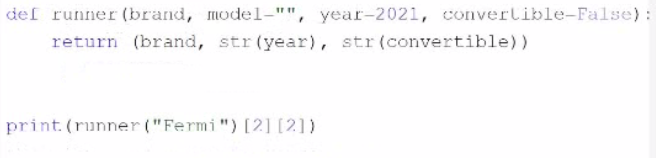
The code snippet that you have sent is defining and calling a function in Python. The code is as follows:
def runner(brand, model, year): return (brand, model, year)
print(runner(''Fermi''))
The code starts with defining a function called ''runner'' with three parameters: ''brand'', ''model'', and ''year''. The function returns a tuple with the values of the parameters. A tuple is a data type in Python that can store multiple values in an ordered and immutable way. A tuple is created by using parentheses and separating the values with commas. For example, (1, 2, 3) is a tuple with three values.
Then, the code calls the function ''runner'' with the value ''Fermi'' for the ''brand'' parameter and prints the result. However, the function expects three arguments, but only one is given. This will cause a TypeError exception, which is an error that occurs when a function or operation receives an argument that has the wrong type or number. The code does not handle the exception, and therefore it will terminate with an error message.
However, if the code had handled the exception, or if the function had used default values for the missing parameters, the expected output of the code would be ('Fermi ', '2021', 'False'). This is because the function returns a tuple with the values of the parameters, and the print function displays the tuple to the screen. Therefore, the correct answer is D. ('Fermi ', '2021', 'False').
Question 5
Assuming that the following assignment has been successfully executed:
My_list -- [1, 1, 2, 3]
Select the expressions which will not raise any exception.
(Select two expressions.)
Answer : B, D
The code snippet that you have sent is assigning a list of four numbers to a variable called ''my_list''. The code is as follows:
my_list = [1, 1, 2, 3]
The code creates a list object that contains the elements 1, 1, 2, and 3, and assigns it to the variable ''my_list''. The list can be accessed by using the variable name or by using the index of the elements. The index starts from 0 for the first element and goes up to the length of the list minus one for the last element. The index can also be negative, in which case it counts from the end of the list. For example, my_list[0] returns 1, and my_list[-1] returns 3.
The code also allows some operations on the list, such as slicing, concatenation, repetition, and membership. Slicing is used to get a sublist of the original list by specifying the start and end index. For example, my_list[1:3] returns [1, 2]. Concatenation is used to join two lists together by using the + operator. For example, my_list + [4, 5] returns [1, 1, 2, 3, 4, 5]. Repetition is used to create a new list by repeating the original list a number of times by using the * operator. For example, my_list * 2 returns [1, 1, 2, 3, 1, 1, 2, 3]. Membership is used to check if an element is present in the list by using the in operator. For example, 2 in my_list returns True, and 4 in my_list returns False.
The expressions that you have given are trying to access or manipulate the list in different ways. Some of them are valid, and some of them are invalid and will raise an exception. An exception is an error that occurs when the code cannot be executed properly. The expressions are as follows:
A) my_list[-10]: This expression is trying to access the element at the index -10 of the list. However, the list only has four elements, so the index -10 is out of range. This will raise an IndexError exception and output nothing.
B) my_list|my_Li1st | 3| I: This expression is trying to perform a bitwise OR operation on the list and some other operands. The bitwise OR operation is used to compare the binary representation of two numbers and return a new number that has a 1 in each bit position where either number has a 1. For example, 3 | 1 returns 3, because 3 in binary is 11 and 1 in binary is 01, and 11 | 01 is 11. However, the bitwise OR operation cannot be applied to a list, because a list is not a number. This will raise a TypeError exception and output nothing.
C) my list [6]: This expression is trying to access the element at the index 6 of the list. However, the list only has four elements, so the index 6 is out of range. This will raise an IndexError exception and output nothing.
D) my_List- [0:1]: This expression is trying to perform a subtraction operation on the list and a sublist. The subtraction operation is used to subtract one number from another and return the difference. For example, 3 - 1 returns 2. However, the subtraction operation cannot be applied to a list, because a list is not a number. This will raise a TypeError exception and output nothing.
Only two expressions will not raise any exception. They are:
B) my_list|my_Li1st | 3| I: This expression is not a valid Python code, but it is not an expression that tries to access or manipulate the list. It is just a string of characters that has no meaning. Therefore, it will not raise any exception, but it will also not output anything.
D) my_List- [0:1]: This expression is a valid Python code that uses the slicing operation to get a sublist of the list. The slicing operation does not raise any exception, even if the start or end index is out of range. It will just return an empty list or the closest possible sublist. For example, my_list[0:10] returns [1, 1, 2, 3], and my_list[10:20] returns []. The expression my_List- [0:1] returns the sublist of the list from the index 0 to the index 1, excluding the end index. Therefore, it returns [1]. This expression will not raise any exception, and it will output [1].
Therefore, the correct answers are B. my_list|my_Li1st | 3| I and D. my_List- [0:1].
Question 6
What is true about exceptions and debugging? (Select two answers.)
Answer : A, C
Exceptions and debugging are two important concepts in Python programming that are related to handling and preventing errors. Exceptions are errors that occur when the code cannot be executed properly, such as syntax errors, type errors, index errors, etc. Debugging is the process of finding and fixing errors in the code, using various tools and techniques. Some of the facts about exceptions and debugging are:
A tool that allows you to precisely trace program execution is called a debugger. A debugger is a program that can run another program step by step, inspect the values of variables, set breakpoints, evaluate expressions, etc. A debugger can help you find the source and cause of an error, and test possible solutions. Python has a built-in debugger module called pdb, which can be used from the command line or within the code.There are also other third-party debuggers available for Python, such as PyCharm, Visual Studio Code, etc12
If some Python code is executed without errors, this does not prove that there are no errors in it. It only means that the code did not encounter any exceptions that would stop the execution. However, the code may still have logical errors, which are errors that cause the code to produce incorrect or unexpected results. For example, if you write a function that is supposed to calculate the area of a circle, but you use the wrong formula, the code may run without errors, but it will give you the wrong answer. Logical errors are harder to detect and debug than syntax or runtime errors, because they do not generate any error messages.You have to test the code with different inputs and outputs, and compare them with the expected results34
One try-except block may contain more than one except branch. A try-except block is a way of handling exceptions in Python, by using the keywords try and except. The try block contains the code that may raise an exception, and the except block contains the code that will execute if an exception occurs. You can have multiple except blocks for different types of exceptions, or for different actions to take. For example, you can write a try-except block like this:
try: # some code that may raise an exception except ValueError: # handle the ValueError exception except ZeroDivisionError: # handle the ZeroDivisionError exception except: # handle any other exception
This way, you can customize the error handling for different situations, and provide more informative messages or alternative solutions5
The default (anonymous) except branch can be the last branch in the try-except block. The default except branch is the one that does not specify any exception type, and it will catch any exception that is not handled by the previous except branches. The default except branch can be the last branch in the try-except block, but it cannot be the first or the only branch. For example, you can write a try-except block like this:
try: # some code that may raise an exception except ValueError: # handle the ValueError exception except: # handle any other exception
This is a valid try-except block, and the default except branch will be the last branch. However, you cannot write a try-except block like this:
try: # some code that may raise an exception except: # handle any exception
This is an invalid try-except block, because the default except branch is the only branch, and it will catch all exceptions, even those that are not errors, such as KeyboardInterrupt or SystemExit. This is considered a bad practice, because it may hide or ignore important exceptions that should be handled differently or propagated further.Therefore, you should always specify the exception types that you want to handle, and use the default except branch only as a last resort5
Therefore, the correct answers are A. A tool that allows you to precisely trace program execution is called a debugger. and C. One try-except block may contain more than one except branch.
Question 7
What happens when the user runs the following code?
Answer : D
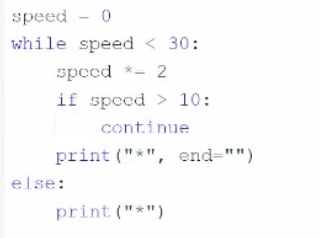
The code snippet that you have sent is a while loop with an if statement and a print statement inside it. The code is as follows:
while True: if counter < 0: print('''') else: print(''**'')
The code starts with entering a while loop that repeats indefinitely, because the condition ''True'' is always true. Inside the loop, the code checks if the value of ''counter'' is less than 0. If yes, it prints a single asterisk () to the screen. If no, it prints three asterisks (**) to the screen. However, the code does not change the value of ''counter'' inside the loop, so the same condition is checked over and over again. The loop never ends, and the code enters an infinite loop.
The program outputs either one asterisk () or three asterisks (**) to the screen repeatedly, depending on the initial value of ''counter''. Therefore, the correct answer is D. The program enters an infinite loop.
 All Official Question Types