Page: 1
/ 14
Total 26 questions
RedHat Red Hat Certified Specialist in Advanced Automation: Ansible Best Practices EX447 Exam Questions
Question 1
Create a playbook called timesvnc.yml in /home/sandy/ansible using rhel system role timesync. Set the time to use currently configured nip with the server 0.uk.pool.ntp.org. Enable burst. Do this on all hosts.
Answer : A
Question 2
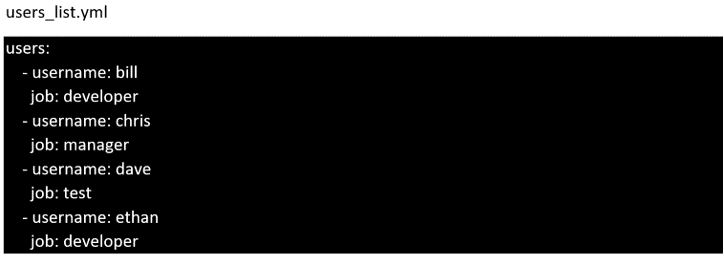
Create the users in the file usersjist.yml file provided. Do this in a playbook called users.yml located at /home/sandy/ansible. The passwords for these users should be set using the lock.yml file from TASK7. When running the playbook, the lock.yml file should be unlocked with secret.txt file from TASK 7.
All users with the job of 'developer' should be created on the dev hosts, add them to the group devops, their password should be set using the pw_dev variable. Likewise create users with the job of 'manager' on the proxy host and add the users to the group 'managers', their password should be set using the pw_mgr variable.
Answer : A
Question 3
Create a file called specs.empty in home/bob/ansible on the local machine as follows:
HOST=
MEMORY=
BIOS=
VDA_DISK_SIZE=
VDB_DISK_SIZE=
Create the playbook /home/bob/ansible/specs.yml which copies specs.empty to all remote nodes' path /root/specs.txt. Using the specs.yml playbook then edit specs.txt on the remote machines to reflect the appropriate ansible facts.
Answer : A
Question 4
Create a file called packages.yml in /home/sandy/ansible to install some packages for the following hosts. On dev, prod and webservers install packages httpd, mod_ssl, and mariadb. On dev only install the development tools package. Also, on dev host update all the packages to the latest.
Answer : A
Question 5
In /home/sandy/ansible/ create a playbook called logvol.yml. In the play create a logical volume called Iv0 and make it of size 1500MiB on volume group vgO If there is not enough space in the volume group print a message "Not enough space for logical volume" and then make a 800MiB Iv0 instead. If the volume group still doesn't exist, create a message "Volume group doesn't exist" Create an xfs filesystem on all Iv0 logical volumes. Don't mount the logical volume.
Answer : A
Question 6
Create a file called requirements.yml in /home/sandy/ansible/roles to install two roles. The source for the first role is geerlingguy.haproxy and geerlingguy.php. Name the first haproxy-role and the second php-role. The roles should be installed in /home/sandy/ansible/roles.
Answer : A
Question 7
Using the Simulation Program, perform the following tasks:
Ad-Hoc Ansible Commands (Number Two) Task:
1. Use the ad-hoc command to make sure php is installed.
2. Use the ad-hoc command to make sure that php is installed and is the latest version.
3. Use the ad-hoc command to make sure that httpd is installed.
4. Use the ad-hoc command to remove httpd from the servers.
Answer : A
 All Official Question Types