Page: 1
/ 14
Total 202 questions
Salesforce Certified Platform Developer II (Plat-Dev-301) Exam Questions
Question 1
A company has a native iOS order placement app that needs to connect to Salesforce to retrieve consolidated information from many different objects in a
JSON format.
Which is the optimal method to implement this in Salesforce?
Answer : A
Apex REST web services are the best method for creating custom endpoints that return data in a specific format, such as JSON, which is perfect for a native iOS application that needs to integrate with Salesforce for retrieving data.
Question 2
When the sales team views an individual customer record, they need to see recent interactions for the customer. These interactions can be sales orders, phone calls, or Cases. The date range for recent interactions will be different for every customer record type.
How can this be accomplished?
Answer : C
A Lightning component can dynamically query and display interactions based on the customer's record type. The component can receive the record type as a parameter and adjust the query accordingly, providing the required functionality without batch processing or additional configurations.
Question 3
A company has a web page that needs to get Account record information, such as name, website, and employee number. The Salesforce record 1D is known to the web page and it uses JavaScript to retrieve the account information.
Which method of integration is optimal?
Answer : D
For retrieving specific records using a known ID, the REST API is optimal due to its stateless, cacheable communications and lightweight structure. It's ideal for web applications that use JavaScript to make requests directly from the user's browser. Using the REST API, the web page can make a simple HTTP GET request to the Salesforce REST service endpoint and retrieve the account information in a format that's easily handled by JavaScript (typically JSON).
REST API Developer Guide
Question 4
A company has a custom component that allows users to search for records of a
certain object type by invoking an Apex Controller that returns a list of results
based on the user's input. When the search is completed, a searchComplete event
is fired, with the results put in a results attribute of the event. The component is
designed to be used within other components and may appear on a single page
more than once.
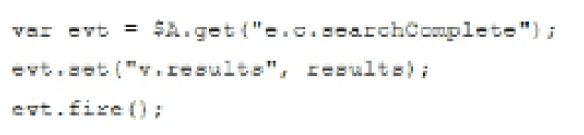
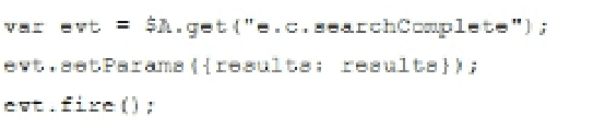
What is the optimal code that should be added to fire the event when the search has completed?
A)

B)
C)

D)
Answer : B
The correct code to fire the event when the search has completed in a Lightning component is option B. $A.get('e.c.searchComplete') is the syntax used to get the event, setParams is used to set the parameters, and fire is used to dispatch the event.
Question 5
A Salesforce org has more than 50,000 contacts. A new business process requires a calculation that aggregates data from all of these contact records. This calculation needs to run once a day after business hours.
which two steps should a developer take to accomplish this?
Choose 2 answers
A.

B.

C.

D.

Answer : B, C
When dealing with large datasets and the need to perform complex calculations or data aggregation, batch Apex and scheduling are typically used to efficiently process records in batches and to execute the process during off-peak hours.
Option B is correct because using the @future annotation allows you to run methods in the background, but it is not suitable for operations that need to process more than 50,000 records, which is the governor limit for future methods.
Option C is correct because implementing the Schedulable interface allows you to schedule the class to run at specified times, such as after business hours, which is a requirement for this scenario.
Option A is incorrect because Queueable is typically used for chaining jobs and handling asynchronous processing of individual transactions, not for processing large datasets at scheduled times.
Option D is incorrect because the Database.Batchable interface is what's needed for processing large datasets, not Database.Stateful. The Database.Stateful interface is used to maintain state across batch job transactions.
Salesforce Developer Documentation on Using Batch Apex: Using Batch Apex
Salesforce Developer Documentation on Scheduling Apex: Scheduling Apex
Question 6
Salesforce users consistently receive a "Maximum trigger depth exceeded'' error when saving an Account. How can a developer fix this error?
Answer : D
A common solution to the 'Maximum trigger depth exceeded'' error is to use a static variable in a helper class. The variable acts as a switch to ensure the trigger logic only executes once per transaction, preventing recursive trigger calls.
Question 7
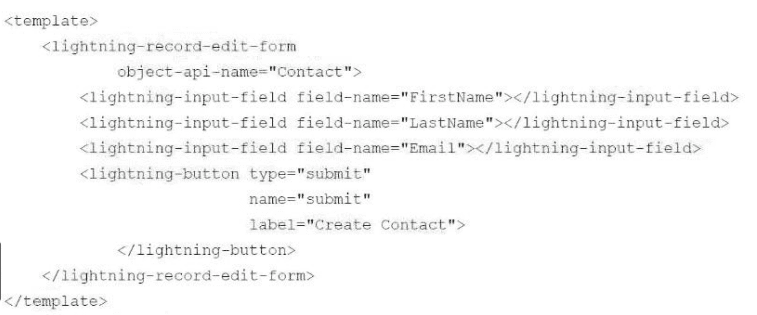
A developer creates a Lightning web component to allow a Contact to be quickly entered. However, error messages are not displayed.
Which component should the developer add to the form to display error messages?
Answer : B
The correct answer is B, lightning-messages. This Lightning Web Components (LWC) service component provides a way to display error messages that are generated during the processing of lightning-input-field components within a lightning-record-edit-form.
Display Error Messages
 All Official Question Types