Page: 1
/ 14
Total 181 questions
Salesforce Certified OmniStudio Developer Plat-Dev-210 Exam Questions
Question 1
An OmniStudio Developer has enabled multi-language support on an OmniScript. The developer has created a set of custom translations for the OmniScript's labels. When the script runs, which language setting determines which translation bundle is displayed to the user?
Answer : C
Multi-language OmniScripts use Salesforce translation infrastructure and custom labels. In normal Salesforce runtime usage, the language shown to the user is driven by the user's Salesforce language setting, not simply by the browser language or by a random session variable. The default OmniScript language is only the fallback/base design language; it does not decide which translated bundle is displayed for each user when translations exist. Option A is wrong because a global Session Variable is not the standard translation selector. Option B is also wrong in this context because OmniScript translations are tied to Salesforce language and Translation Workbench/custom-label behavior. Therefore, the user's Salesforce language setting is the correct controlling source for displayed translations.
================
Question 2
An OmniStudio Developer at Ursa Major Solar is building a component to display solar panel warranty information. The source data is a JSON array from a REST API call, but the field names in the JSON do not match the fields required for display in a FlexCard. The project requirements state that no Apex code should be written.
Which OmniStudio tool should the developer implement to restructure the incoming JSON data before it is displayed?
Answer : C
A Data Mapper Transform is the correct tool because the requirement is to restructure incoming JSON before a FlexCard displays it. The source data already comes from a REST API, so the developer does not need a Data Mapper Extract, which retrieves Salesforce data, or a Data Mapper Load, which writes data to Salesforce. An Integration Procedure can orchestrate the REST call and invoke the transform, but the actual no-code restructuring of JSON field names and paths is performed by a Data Mapper Transform. Salesforce documentation states that Data Mapper Transform mappings use input paths and output paths to reshape data, including JSON structures, which directly matches this scenario.
================
Question 3
No More Homelessness, a nonprofit organization, needs to implement a solution for its case managers to quickly view an applicant's pending service requests, which are stored in both Salesforce Contact records and an external grant management database. The solution must display the data consistently without requiring the case manager to navigate away from the Contact record.
Which OmniStudio tool should the OmniStudio Developer use to retrieve and display the combined data in a single, focused view on the Contact record page?
Answer : D
A FlexCard is the correct front-end component for a single, focused view on a Contact record page. The data may come from Salesforce and an external grant management system, and an Integration Procedure can be used behind the scenes to aggregate that data. However, the question asks which OmniStudio tool should retrieve and display the combined information in a compact record-page view. A Data Mapper Transform reshapes data but does not provide the visual record-page card. A Calculation Procedure performs calculation logic, not case-manager display. OmniScript is better for guided multi-step processes, not quick contextual viewing. Salesforce documentation confirms that FlexCards can be configured with data sources, including Salesforce or external databases, and can display contextual information on record pages.
================
Question 4
Healthmark Network, a healthcare provider, needs a solution to display a patient's integrated health summary on a single page for their nurses. This summary must quickly pull demographic data from Salesforce and recent lab results from an external electronic medical records (EMR) system. The lab results must be displayed in a responsive, list-like format. Which OmniStudio component should an OmniStudio Developer use to combine, display, and manage the interactivity of this complex, multi-source patient data?
Answer : D
A FlexCard is the correct user-interface component for displaying summarized, contextual, responsive information from one or more data sources. The scenario is not asking for a guided form or step-by-step process; it asks for a single-page health summary with list-like lab results and interactive display behavior. An Integration Procedure can absolutely be used behind the FlexCard to aggregate Salesforce demographic data and EMR lab results, but the component that displays and manages the responsive interaction is the FlexCard. A Data Mapper Extract only retrieves Salesforce data and does not handle external EMR data or UI interaction. OmniScript is better for guided data collection and process automation, not a compact summary card. Therefore, the front-end OmniStudio component should be a FlexCard.
================
Question 5
A developer has an existing DataRaptorLoad that insert Contact records with inputs as LastName and firstName. The DataRaptor works as expected when previewed.
The developer creates an integration Procedure to test the DataRaptor and is using a SetValues element in the Integration Procedure toset the first name and last name for the contact record. The DataRaptor and Integration Procedure are set up as shown in the exhibit below.
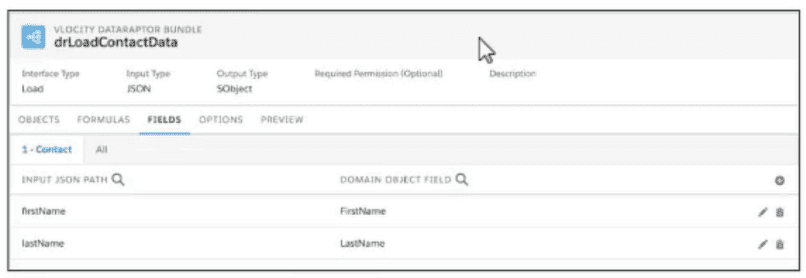
When the developer executes the Integration procedure in preview, the following error message displays: Required fields are missing: [last Name]'',
How should the developer address this issue?
Answer : A
According to theIntegration Procedure Actionspage, ''To pass data from a Set Values action to a DataRaptor action, add the Set Values action name to the Additional Input field of the DataRaptor action.''
Question 6
An OmniStudio Developer has built a process where the user has the option to update either the Billing Address or the Shipping Address, but not both. The Integration Procedure input includes updateBillingAddress and updateShippingAddress flags. To enforce the rule that at least one address is updated but prevent both updates, how should the developer structure the conditional logic in the Integration Procedure?
Answer : B
Two separate Group elements with mutually exclusive conditions provide the cleanest declarative control. One Group should execute only when updateBillingAddress is true and updateShippingAddress is false. The other Group should execute only when updateShippingAddress is true and updateBillingAddress is false. This enforces that only one address update path runs. A single OR condition would allow either or both flags to be true, so it cannot prevent simultaneous updates. A Try-Catch Block reacts after an error occurs; it is not the right way to express business-rule branching. An HTTP Action would add unnecessary external dependency. Integration Procedure blocks and groups are designed to run related steps conditionally, so mutually exclusive Group conditions are the correct structure.
================
Question 7
Refer to the exhibit.

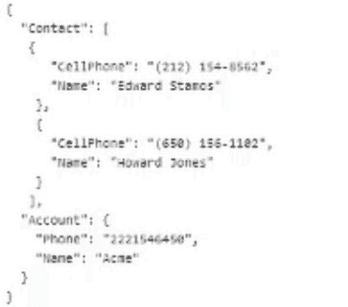
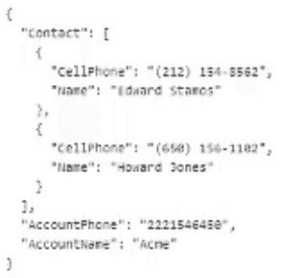
The card layout uses an integration Procedure as a data source. The cards use the layout data source.
Which JSON data structure supports this card layout and follows best practices?
A)
B)
C)
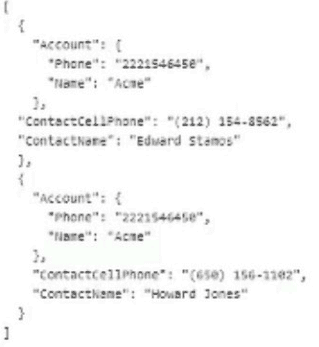
Answer : C
The JSON data structure in option C supports the card layout and follows best practices. It has a list of objects, each representing a product, with the properties ''ProductCode'', ''ProductName'', ''ProductDescription'', and ''ProductPrice''. These properties match the fields in the card layout. The JSON data structure also follows the naming convention of using camel case for property names. The JSON data structures in options A and B do not match the fields in the card layout and do not follow the naming convention.
 All Official Question Types